
Why Your MyBoy Cheats Fail (and the One Tiny Toggle That’s Usually to Blame)
If you’ve ever copy pasted a cheat into MyBoy, checked the little box like a responsible adult, and then… nothing happens (no rare candies, no max money, no wild level 100 Mewtwo strolling up like it owns the place)… you’re not alone.
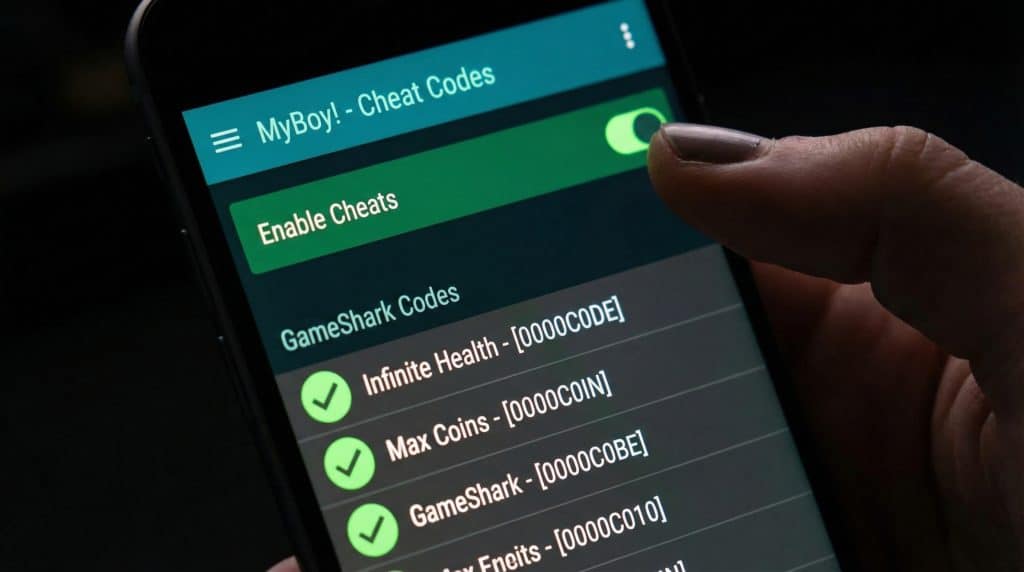
Most “MyBoy hates me” cheat failures come down to one stupidly easy thing: you turned on the cheat entry, but you didn’t turn on Enable Cheats at the top of the cheats screen. Yes, there are two switches. Yes, that’s annoying. Yes, I have absolutely been personally victimized by this.
Before you start rage googling new codes like a raccoon in a trash can, here’s the short, actually useful checklist that fixes the vast majority of cheat issues.
Step 1: Make sure you’re not using the “right” cheat for the wrong game
Cheats are picky. Like “won’t work unless the stars align and your ROM is wearing the correct outfit” picky.
1) Check your ROM region + version
Most cheat sites assume you’re using the USA (U) v1.0 ROM.
- If your file name has (USA) or (U), good start.
- If it has (E) (Europe) or v1.1, a lot of codes will fail quietly because the memory addresses don’t match.
Example: a FireRed (U) v1.0 code often won’t work on FireRed v1.1. You can enter it perfectly and the game will just stare at you.
2) Match the code format to what MyBoy expects
Not all cheats are the same species.
- GameShark/Action Replay often look like:
3AF85ACA C4D18CEC(two chunks of 8 characters) - CodeBreaker often looks like:
820257BC 423F(different format)
MyBoy needs the right type selected or it’s basically reading your cheat like modern art.
3) Don’t ignore “Master Code” requirements
If your cheat source says “requires master code,” believe it. The master code needs to be added as its own cheat entry using a master code setup guide and enabled before the other cheats.
And no, master codes aren’t one size fits all make sure it matches your game/version. Master codes are dramatic like that.
Step 2: Add the cheat the way MyBoy actually likes it
Here’s the method that causes the least chaos (and the least “why is nothing working??” pacing).
- Start your game first. (MyBoy behaves better when the game is already running.)
- Open MyBoy’s menu → Cheats → tap +
- Name it something you’ll recognize later. “Infinite Money” beats “Cheat 4” (which is how you end up living in confusion).
- Pick the cheat type
- “Auto Detect” is usually fine for GameShark/Action Replay
- Pick CodeBreaker manually if you know that’s what you’re using
- Paste the code exactly (copy/paste is your friend—one wrong character and it’ll fail with zero explanation)
- Now the important part: turn on BOTH switches
- ✅ The checkbox next to the cheat entry
- ✅ The global Enable Cheats toggle at the top of the cheats page
If either one is off, your cheat will do absolutely nothing, like a lamp plugged into nothing pretending it’s helping.
Multi line cheats: the “free version” speed bump
Some cheats come in multiple lines. And MyBoy’s free version is like, “Cool cool cool… but no.”
- Paid MyBoy (~$5): you can paste multi line cheats as one block (easy)
- Free MyBoy: you typically need one line per cheat entry
So if a cheat has two lines, you create two entries:
- “Walk Through Walls (Part 1)” → paste line 1
- “Walk Through Walls (Part 2)” → paste line 2
Then enable both. If you forget one part, the whole cheat usually fizzles.
(Do you need the paid version? Not necessarily. But if you use multi line codes a lot, the paid version is basically buying yourself five dollars’ worth of sanity.)
Don’t nuke your save file: how I test cheats without regrets
Cheats are fun until your save file starts acting haunted.
Here’s how to stay safe:
Turn on ONE cheat at a time
Enable one, play for a minute, make sure it works, then add the next. Stacking a whole buffet of cheats at once is how you get crashes and weird glitches.
As a rough guideline, 3-5 compatible cheats at once is usually okay. Usually.
Save state first (seriously)
Before trying a new code, make a save state. If things go sideways, you can roll back like it never happened.
Also: if you see something like a Bad Egg or your bag starts doing interpretive dance, close MyBoy immediately without saving in game. Saving after corruption can make it permanent. Ask me how I know (don’t).
Item modifier codes: use them like hot sauce
If you’re using “receive X item” or “item modifier” cheats:
- Turn it on right before you pick up/receive the item
- Then turn it off immediately after
Leaving item modifiers on long term is a classic way to mess up your inventory.
Troubleshooting: when the cheat still won’t behave
If you’ve done all the above and your cheat is still playing dead, run through this:
- Nothing happens at all: Go back and confirm both toggles are on (checkbox + Enable Cheats).
- Wrong Pokémon/item shows up: You probably have a ROM mismatch (region/version problem).
- Game crashes when you enable it: Disable everything, then re-enable cheats one at a time to find the conflict.
- It worked, then stopped: This can happen when you mix save states and in game saves weirdly. Try loading your in game save after enabling cheats.
- You turned it off and it’s still “stuck”: Force close MyBoy, reopen, then load your save again. Sometimes the effect hangs out in memory like an unwanted houseguest.
Where I’d grab codes (so you’re not wasting your life on broken forum posts)
I’ve had the best luck with sites that actually label ROM versions and master code requirements, like:
- PokemonCoders
- SuperCheats
Random forum codes can work, sure… but they can also be completely wrong for your ROM and you’ll spend 45 minutes thinking you’re the problem. (You’re not. The internet is just messy.)
If you take nothing else from this: check your ROM version, add the master code if needed, and flip BOTH cheat switches with a GS Chronicles working code list. That combo fixes the overwhelming majority of “MyBoy cheats don’t work” drama and gets you back to the important stuff, like sprinting through walls and pretending you didn’t.